Policy Actions
Policy Actions define how Boost Security responds to findings detected in your environment. They are the building blocks used within policy rules to determine when a rule should apply and what action should be taken when matching findings are identified.
When creating a new policy or updating an existing one, you configure policy actions to control how findings are evaluated, filtered, and handled. This allows you to tailor enforcement behavior based on risk, context, and organizational requirements—rather than treating all findings the same.
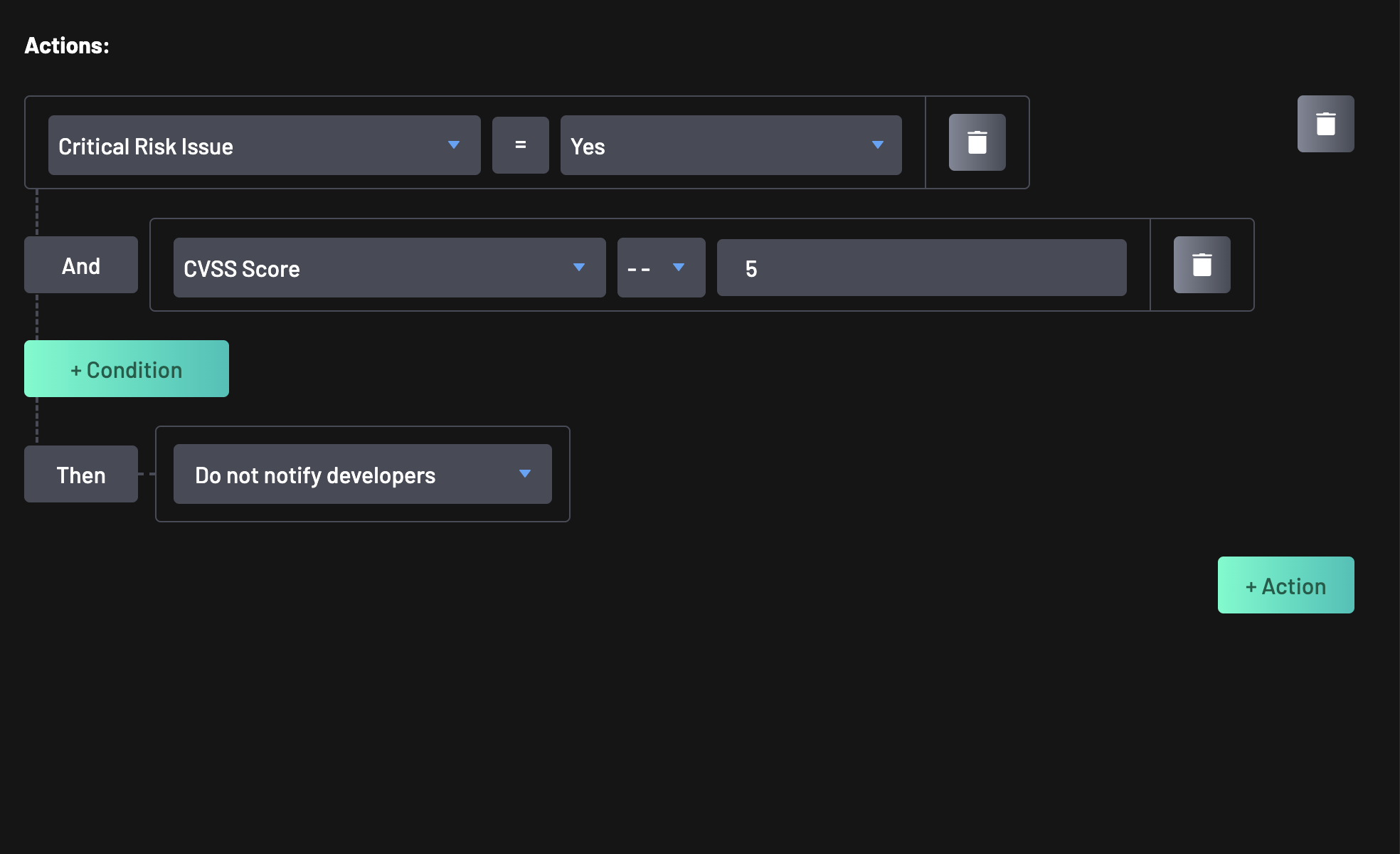
What Are Policy Actions?
Policy Actions are rule-level conditions and evaluators that determine how findings are processed under a policy. They allow you to:
- Filter findings based on specific attributes (for example, severity, exploitability, or reachability)
- Target specific environments, repositories, or technologies
- Apply different responses depending on the risk profile of a finding
Each policy can include:
- A default action, which applies when no custom rules are defined
- One or more rules, each containing actions that act as triggers or filters for findings
Note
A policy without rules falls back to the default action. You can add rules to the policy to define customized behavior using advanced filter conditions for findings.
How Policy Actions Are Used
Policy Actions are evaluated as policy rules. When a finding matches the defined action criteria, the rule’s configured response is applied. This enables fine-grained control such as:
- Escalating only high-risk or exploitable vulnerabilities
- Applying stricter enforcement to internet-facing or production assets
- Differentiating treatment of development vs runtime dependencies
- Controlling behavior based on repository metadata or scanner source
In short, policy actions let you express intent: what matters most, where, and under what conditions.
Available Policy Rule Actions
The actions for policy rule categories include:
- OpenSSF Score: This action checks for OpenSSF. OpenSSF Score is a collection of security health metrics for open source, allowing users to evaluate the security practices of an open source package in your codebase.
- EPSS Score: This can be used to target EPSS in your code. EPSS (Exploit Prediction Scoring System) measures how likely a particular vulnerability will be exploited.
- CVSS Score: CVSS generates a score from 0 to 10 based on the severity of a vulnerability.
- Confidence: This action would check for scenarios where the confidence level of a vulnerability is high, medium, low, or not set. See Matching a Confidence That Is Not Set.
- Severity: This action would check for severity of findings in Critical, Warning, or Minor states.
- Internet Reachability: Checks whether a component or resource is reachable from the internet. It's value is represented as Reachable.
- Code Exposes: This action examines the composition of your application code, whether it exposes key components such as APIs, or the use of risky third-party libraries that may cause security breaches.
- Critical Risk Issues: This action targets issues that pose a critical risk to your environment or application. These include high-severity vulnerabilities or misconfigurations that demand immediate attention.
- Manual Tags: This action evaluates assets based on custom manual tags assigned within your environment.
- Original Rule ID: This action reviews the original rule Id associated with findings in your codebase, ensuring that all known issues are tracked and addressed. You can find the "Original Rule ID" value for any finding in the finding's detail page.
- Dev Dependency: This action determines if a dependency is only used during development. It's corresponding values are Yes, Runtime, or Unknown.
- Kubernetes Cluster: This action checks the configuration and security of your Kubernetes clusters, ensuring they are set up securely and following best practices.
- Kubernetes Service: This action assesses the configuration and security of your Kubernetes services, ensuring they are properly configured and secured.
- Vulnerability Class: Checks for the class or category of a vulnerability, helping group and apply rules based on the nature of the security issue (e.g., XSS, Injection, etc.).
- Personal Information: This action scans for personal information within your codebase, ensuring that sensitive data is not inadvertently exposed.
- Vulnerable Code Reached: This action checks whether the vulnerable portion of the code is actually reachable at runtime.
- Repository Flag: This action checks for specific flags within your repositories, which can indicate certain conditions or states that need to be addressed.
- Repository Labels: This action reviews the labels assigned to your repositories, ensuring they are correctly labeled for policy enforcement and management.
- Repository Languages: This action identifies the programming languages used within your repositories, helping to enforce language-specific security policies.
- Repository Visibility: This action reviews the visibility settings of your repositories, ensuring they are appropriately set to public or private based on your security policies.
- Root Access: This action identifies cases where code, scripts, or containers are running with root-level permissions, which could introduce serious security risks if not controlled.
- Forked Repo: This action determines whether a repository is a fork of another, which may impact trust level or review processes.
- Data Access Reachability - This action evaluates whether sensitive data in your system is accessible based on code flow analysis. It helps identify potential pathways that might expose confidential information to unauthorized access.
- Scanner: This action identifies the scanners used to check your codebase for vulnerabilities, ensuring that appropriate scanning tools are in place and configured correctly.
- Secret Type: This action specifies the type of secret the rule checks for.
- Secret Validity: This action checks for the validity of a secret if it is Valid, Invalid, or Unknown.
- States: This action reviews the various states of findings and vulnerabilities within your codebase, such as open, fixed, or ignored.
- Transitive Vulnerability: This action checks for vulnerabilities that are inherited from dependencies of your dependencies, ensuring a thorough assessment of your codebase's security.
- Vulnerability Identifiers: This action reviews specific identifiers associated with vulnerabilities in your codebase, ensuring that all known issues are tracked and addressed.
- Priviledged User: This action targets findings associated with users or service accounts that have elevated privileges. It enables policy checks on access control risks or improper permission assignments.
Matching a Confidence That Is Not Set
A finding whose scanner never reported a confidence displays a confidence of not set. The Confidence attribute's value list offers this alongside High, Medium, and Low, labeled Unset in the policy rule editor, so a rule can target those findings directly.
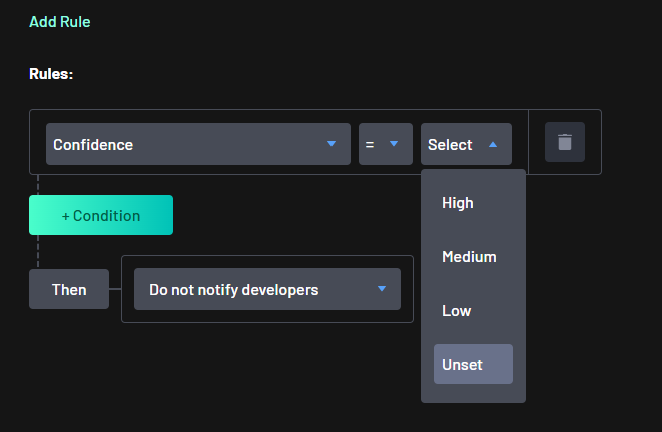
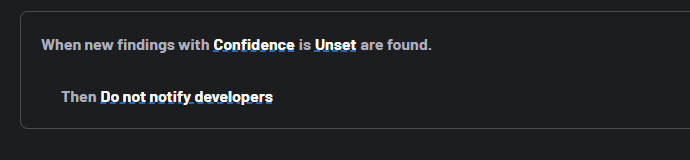
Unset is selected like any other confidence value, on its own or together with the assigned levels in the same condition. The Confidence attribute's operators are offered per attribute rather than per value, so all five of them — =, >, >=, < and <= — apply to Unset as well. A saved rule reads back in the rule summary as "When new findings with Confidence is Unset are found."
In a comparison, a confidence that is not set ranks below Low: not set < low < medium < high. A rule matching a confidence below Medium therefore also matches findings whose confidence is not set, while a rule matching a confidence of Low or above does not.
Note
This ordering already applied before Unset could be selected, so a rule matching a confidence below Medium was already matching these findings. No saved rule changes behavior and no policies were migrated. What is new is that Unset can now be chosen when a rule is written.