Troubleshooting Scan Errors
When a scan fails, the Scans page shows its error message. Find that message below to learn what it means and how to fix it.
Warning
While a scanner errors, it doesn't protect the repository. Boost Security fails open: when a scan fails, its commit status check is set to success, so your pull requests and merge requests aren't blocked. A passing check therefore doesn't mean the commit was scanned.
Every Scanner Failed on the Same Commit
When every scanner provisioned on a repository failed on the same commit with the same message, the cause is the state of the repository or of the commit, not one of the scanners. Look up that message below rather than changing the scanners.
Scan misconfiguration: ... no supported files were detected or trivy detected no language files
A dependency scanner, software composition analysis (SCA) or SBOM, found no dependencies to scan:
no supported files were detected: none of the lockfiles the scanner supports was found in the repository.trivy detected no language files: the repository has a manifest file, but it's empty, or none of its packages has a pinned version, so it isn't treated as a lockfile.
Dependency scanners ignore Boostignore patterns for lockfiles, so Boostignore isn't the cause.
If the repository has no dependencies for that scanner, deprovision the scanner from it. Otherwise, commit a file the scanner supports: see Files That Trigger Each Scanner.
You can also use another scanner, such as OSV Scanner, which supports different files than the Trivy-based scanners.
pathspec <branch> did not match
The branch the scan expected doesn't exist in the repository: the default branch was renamed, or the repository was empty when it was scanned.
Review the branches configured in Boost Security, as described in Managing Multiple Branches, and the default branch configured in your SCM. When the default branch changes in your SCM, Boost Security picks up the change at its next synchronization.
bad object or bad revision
The scanned commit no longer exists: it was removed by a force push, or its branch was deleted. A one-off error resolves itself once a later commit is scanned.
git merge-base ... exit status 1
The pull request's source branch and its target branch share no common ancestor, so the changes of the pull request can't be computed.
If the source branch still exists, rebase it on the target branch. If it no longer exists, the error is a one-off and shouldn't repeat.
failed uploading results, request is too large
The scan ran, but its results were too large to be stored, so nothing was recorded. Reduce the volume of results:
- exclude files and directories with Boostignore;
- or split the repository into sub-repositories with Monorepository Management. Read that page first: converting a repository has prerequisites.
For software composition analysis (SCA) scanners, excluding binaries doesn't reduce the volume: split the repository instead.
Cannot connect to the Docker daemon or Image Pull Timeouts
The CI runner couldn't run the scanner's container or couldn't download its image. Check that the runner can run Docker containers and reach the container registries. On GitLab self-hosted runners, see Enabling the Privileged Mode.
Re-running an Old CI Job Fails
Re-running a past Boost Security CI job fails, for example with HTTP Basic: Access denied, or with a 404 error on the scan trigger after about two hours. Don't re-run the CI job: trigger a new scan instead.
For scanners provisioned with Zero Touch Provisioning (ZTP), trigger the scan from the Scanner Coverage page:
-
Click the N scanners button of the repository (for example, 7 scanners) to open its scanner details.

-
Click Trigger Scan next to the scanner.
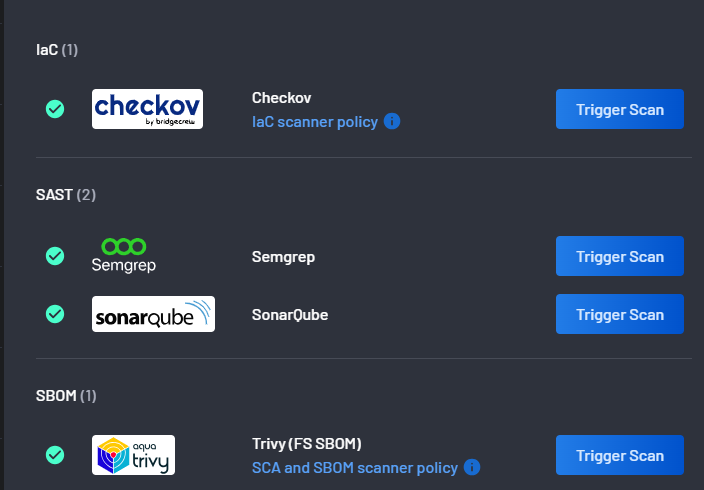
For scanners you provisioned manually, trigger a new run of the pipeline in the code repository itself.